
 English
  Russian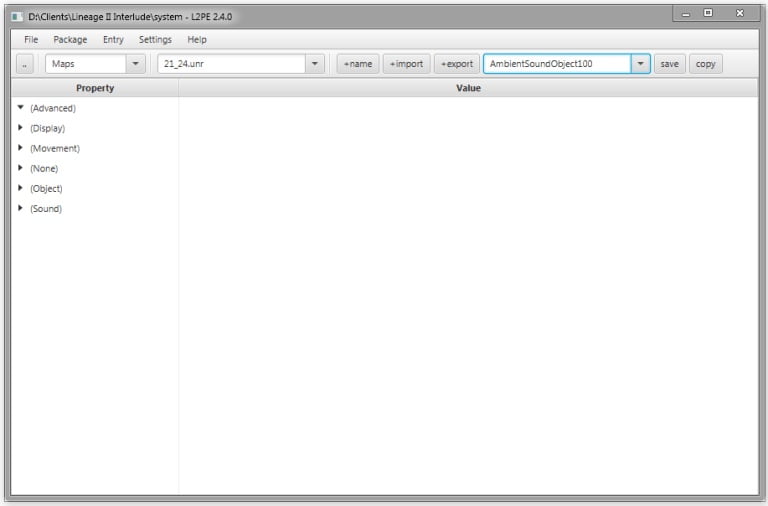

L2PE v2.4 – Lineage 2 Object Properties Editor + Java Fix
Looking for a tool to edit Lineage 2 object properties? L2PE v2.4 is a powerful editor that allows you to modify emitters, colors, and other object attributes inside Lineage 2 client files.
It is widely used by developers and modders to customize visual effects and game elements safely and efficiently.
Features
- Edit object properties such as emitters, colors, and visual effects
- Import and export objects from Lineage 2 client files
- Compatible with newer Lineage 2 chronicles
- Lightweight and easy to use
How to Use
- Extract the downloaded zip
- Run l2pe.jar
- Open your Lineage 2 file
- Edit object properties as needed
- Save your changes
Automation
This tool is designed for manual editing of object properties and does not include automation scripts.
Compatibility
Supports multiple Lineage 2 client versions, including newer chronicles.
Why to Use?
It is an essential tool for modifying Lineage 2 visual elements and object properties. It allows precise control over effects and assets, making it ideal for advanced client customization.
How to Run on Latest Java Versions
If you encounter issues such as preview not working or the following error:
Error: Could not find or load main class l2pe.jar
Caused by: java.lang.ClassNotFoundException: l2pe.jar
Follow these steps:
- Download and install JavaFX for your Java version
- Run Command Prompt as administrator and type:
set PATH_TO_FX="C:\Program Files\Java\javafx-sdk-11.0.2\lib"
Then navigate to your L2PE folder:
cd C:\Users\MyPC\Desktop\Folder
Finally run:
java --module-path %PATH_TO_FX% --add-modules javafx.controls,javafx.fxml,javafx.swing -jar l2pe.jar
Credits
Developed by Aleksey Sazonov
Source code:
GitHub Repository

CerberuS –
Very nice tool! Thanks for share!
Upvote if this was helpful (0) Downvote if this was not helpful (0) Watch Unwatch Flag for removal