
 EN
EN  RU
RU 


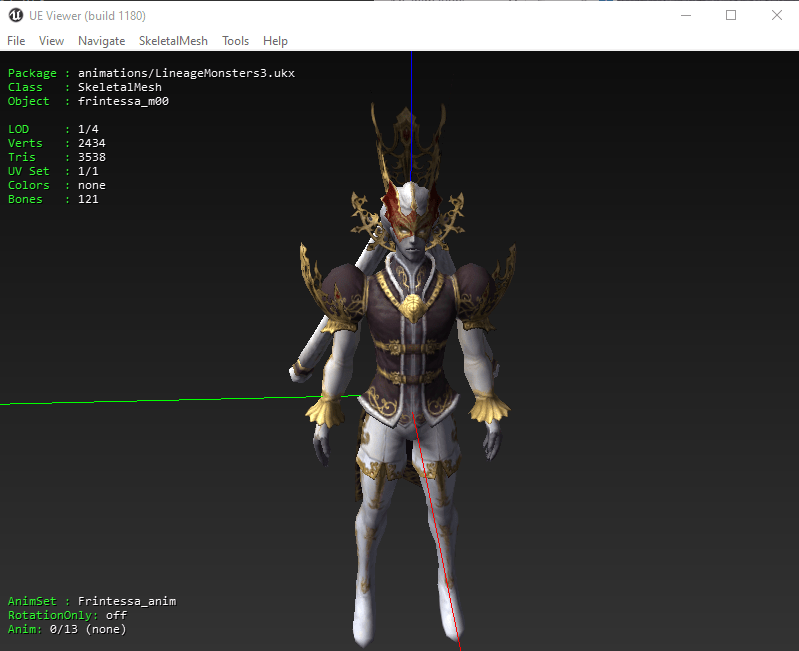

UE Viewer – Unreal Engine Package Viewer for Lineage 2 Files
Looking for a powerful Unreal Engine viewer for Lineage 2 UE Viewer (also known as UModel) is a versatile tool that allows you to browse and extract assets from Unreal Engine-based games.
It enables you to open Lineage 2 package files and extract models, meshes, animations, textures, and more. Widely used by modders and developers, UE Viewer supports hundreds of games across multiple Unreal Engine versions.
Features
- Supports over 300 Unreal Engine games across multiple engine generations
- View skeletal meshes with animations
- Inspect skeleton hierarchy and vertex bindings
- View static meshes and vertex meshes
- Display materials and their internal structure
- Export skeletal, vertex, and static meshes with animations
- Export textures in TGA and DDS formats
- Export sounds, ScaleForm files, and FaceFX assets
How to Use
- Extract downloaded zip
- Run umodel.exe
- Select your Lineage 2 client folder
- Click OK to load packages
- Press H to view available hotkeys
Automation (Batch Scripts)
Includes batch scripts for quick exporting and automation.
- Edit Export.bat using Notepad
- Replace Test.utx with your target file (.utx, .ukx, etc.)
- Run Export Textures.bat or other scripts
- Customize scripts based on your workflow needs
Compatibility
This tool supports a wide range of Unreal Engine versions and is fully compatible with Lineage 2 client files.
Why to Use?
This tool is one of the most powerful tools for exploring and extracting game assets. It is ideal for Lineage 2 modding, research, and asset analysis.
With support for hundreds of games and flexible export options, it is a must-have tool for both beginners and advanced users.
Credits
Developed by Konstantin Nosov (Gildor)
Support the developer:
https://www.gildor.org/en/donate


Tomahawkeye –
Amazing tool! Thank you!
Upvote if this was helpful (0) Downvote if this was not helpful (0) Watch Unwatch Flag for removal