
 RU
RU  EN
EN 



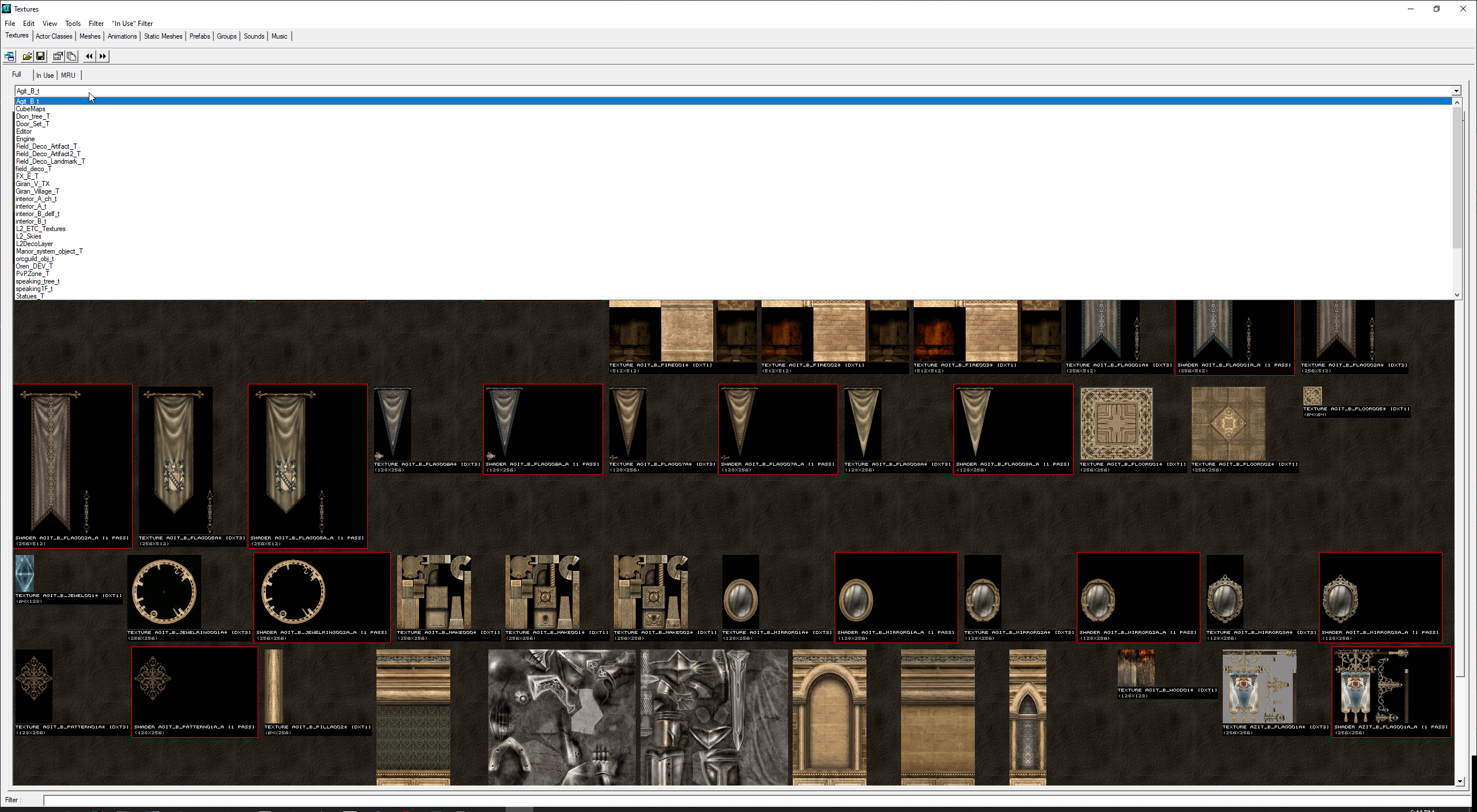
L2Editor + Source – Lineage 2 Package Viewer, Editor & Extractor
Looking for a complete tool to work with Lineage 2 package files? L2Editor is a powerful viewer, editor, and extractor designed for native Lineage 2 packages.
It supports formats such as .utx, .ukx, and more, using original Lineage 2 libraries like LineageEffect, LineageEffect_br, and LineageWarrior from the Salvation client.
This package also includes the full source code, allowing advanced users to customize and extend the tool.
Features
- Supports file types: u, uax, ukx, unr, usx, utx
- Compatible with native package versions: 111 and 121
- Ability to save packages as version 123 (license 0)
- Supports multiple Lineage 2 chronicles: Prelude, Interlude, High Five, Helios, Salvation
- Includes full source code for development and customization
How to Use
- Extract L2Editor-Compiled.zip into your Lineage 2 folder
- Run UnrealEd.exe
- Start editing or viewing package files
Note: To modify settings, edit UT2003.ini.
Note: For Prelude clients, use Prelude-System.zip instead.
Automation
This tool does not include automation scripts but provides advanced manual editing capabilities for developers.
Compatibility
Supports multiple Lineage 2 chronicles including Prelude, Interlude, High Five, Helios, and Salvation.
Why to Use?
It is one of the most advanced tools for working with Lineage 2 packages. It allows full access to native files and provides flexibility for both editing and extraction.
With included source code, it is ideal for developers who want to extend or customize functionality.
How to Use (Source Code)
- Extract Source.zip
- Open the project using Visual Studio 2013 Community Edition
- Run System\!GenerateLibs.bat to generate required libraries
Credits
Developed by lordofdest
Issues & support:
https://bitbucket.org/lordofdest/l2editor/issues
Вопрос
papelx –
Hi, i’m trying run UnrealEd in Prelude System, i extracted Prelude System .rar inside my L2 Prelude folder, but when i try run UnrealEd throws me “Files are corrupted” If i try run clean prelude system the game never starts, i think is for windows version. Have some solution/suggestio to fix it? Thanks.
Это полезно (0) Это не полезно (0) Следить за обновлениями Перестать следить за обновлениями Отметка удалена
admin –
Hello,
Please take a look at L2Editor’s issues: https://bitbucket.org/lordofdest/l2editor/issues
Unfortunately we can not assist you further.
Kind Regards
Это полезно (0) Это не полезно (0) Отметка удалена
Elfiniooo –
Amazing!! Best tool! Thank you!
Это полезно (0) Это не полезно (0) Следить за обновлениями Перестать следить за обновлениями Отметка удалена